> ## Documentation Index
> Fetch the complete documentation index at: https://cloud.laravel.com/docs/llms.txt
> Use this file to discover all available pages before exploring further.
# Deployments
## Introduction
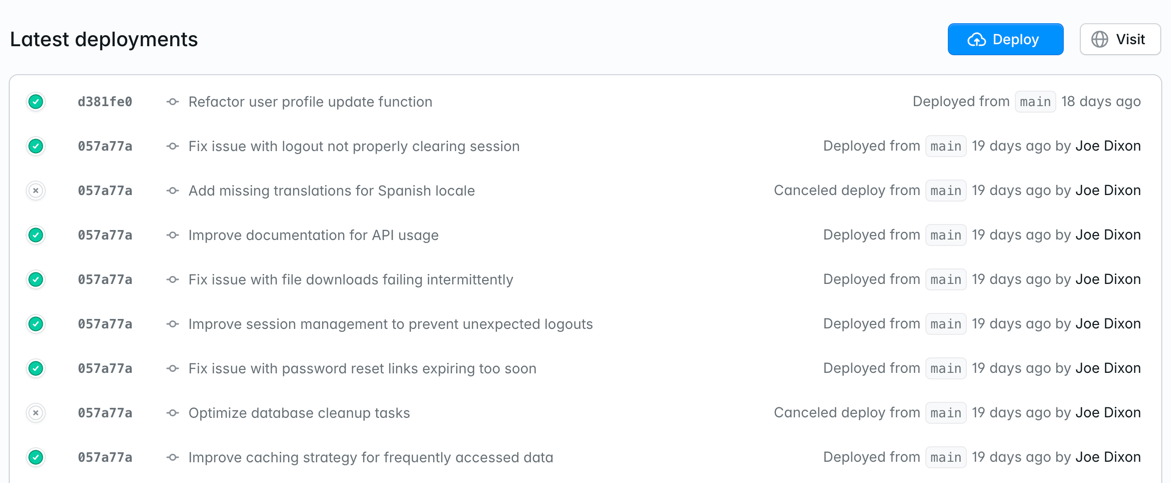
Deployments in Laravel Cloud happen whenever you have new code to release, new resources to attach, or environment settings that you want to update.
When a new deployment is triggered, Laravel Cloud will take your code and environment settings, build a Docker image configured for your chosen PHP version, and then run your build and deploy commands.
Once your build completes successfully, the existing deployment will be gracefully terminated (allowing any running processes to complete) and the new deployment will be brought online with zero downtime.
 ## Deploy options
### Push to deploy
Every time you push new code to your remote Git branch, a new deploy is automatically triggered. Push to deploy is enabled by default on all environments. To change this setting, go to Settings > Deployments.
### Deploy hooks
If you prefer to trigger a deployment via an HTTP endpoint, you can enable the "Deploy hook" option in Settings > Deployments. When enabled, you will be provided a URL that you can make a POST request to as part of your CI/CD flow. You can refresh your URL anytime from the Deployments settings.
You can also deploy a specific commit by passing a `commit_hash` query parameter to the deploy hook URL. The commit hash should belong to the branch configured for the environment.
```shell theme={null}
curl -X POST "https://your-deploy-hook-url?commit_hash=abc123def456"
```
If no commit hash is provided, the latest commit from the environment's branch will be deployed.
#### Example using GitHub Actions
Deploy hooks are perfect for integrating Laravel Cloud with your CI / CD pipeline. Here's a complete example using GitHub Actions:
1. First, add your deploy hook URL as a secret in your GitHub repository:
* Go to your GitHub repository settings
* Navigate to Secrets and variables → Actions
* Add a new secret named `LARAVEL_CLOUD_DEPLOY_HOOK` with your deploy hook URL
2. Create a `.github/workflows/deploy.yml` file in your repository:
```yaml theme={null}
name: Deploy to Laravel Cloud
on:
push:
branches: [ main ]
jobs:
deploy:
runs-on: ubuntu-latest
steps:
- name: Deploy to Laravel Cloud
run: |
curl -X POST "${{ secrets.LARAVEL_CLOUD_DEPLOY_HOOK }}?commit_hash=${{ github.sha }}"
```
3. Commit and push the workflow file to trigger your first deployment.
Unlike traditional deployment processes that require installing dependencies and running build commands in CI, Laravel Cloud handles all of this for you. The deploy hook simply triggers Laravel Cloud to:
* Pull your code from the specified commit
* Run your configured build commands
* Run your configured deploy commands
* Deploy your application with zero downtime
### Manual
You can trigger a deployment from the Laravel Cloud dashboard anytime by clicking the "Deploy" button from the Environment overview page or Deployments page. After updating environment settings, you can also click "Save & Deploy" to manually trigger a deployment.
## Troubleshooting
### Framework or runtime version not supported
Laravel Cloud requires Laravel 9 or greater. In addition, you should be using the latest minor version of the `laravel/framework` Composer package. The minimum minor versions required are:
* Laravel 11: `v11.41.3`
* Laravel 10: `v10.48.28`
* Laravel 9: `v9.52.20`
Watch [this video](https://youtu.be/95iC9L-3CxY) to learn more about fixing this framework error.
If you receive an error during a deployment that *"The \[laravel/framework] package was found in the \[composer.lock] file, but the version is not supported. Upgrade Laravel to the latest minor version"* then you can update by running the following command:
```shell theme={null}
composer update laravel/framework
```
Laravel Cloud requires Symfony 7.4 LTS or 8.x. Ensure your `composer.json` specifies a compatible version and that your `composer.lock` is up to date:
```shell theme={null}
composer update symfony/framework-bundle
```
## Deploy options
### Push to deploy
Every time you push new code to your remote Git branch, a new deploy is automatically triggered. Push to deploy is enabled by default on all environments. To change this setting, go to Settings > Deployments.
### Deploy hooks
If you prefer to trigger a deployment via an HTTP endpoint, you can enable the "Deploy hook" option in Settings > Deployments. When enabled, you will be provided a URL that you can make a POST request to as part of your CI/CD flow. You can refresh your URL anytime from the Deployments settings.
You can also deploy a specific commit by passing a `commit_hash` query parameter to the deploy hook URL. The commit hash should belong to the branch configured for the environment.
```shell theme={null}
curl -X POST "https://your-deploy-hook-url?commit_hash=abc123def456"
```
If no commit hash is provided, the latest commit from the environment's branch will be deployed.
#### Example using GitHub Actions
Deploy hooks are perfect for integrating Laravel Cloud with your CI / CD pipeline. Here's a complete example using GitHub Actions:
1. First, add your deploy hook URL as a secret in your GitHub repository:
* Go to your GitHub repository settings
* Navigate to Secrets and variables → Actions
* Add a new secret named `LARAVEL_CLOUD_DEPLOY_HOOK` with your deploy hook URL
2. Create a `.github/workflows/deploy.yml` file in your repository:
```yaml theme={null}
name: Deploy to Laravel Cloud
on:
push:
branches: [ main ]
jobs:
deploy:
runs-on: ubuntu-latest
steps:
- name: Deploy to Laravel Cloud
run: |
curl -X POST "${{ secrets.LARAVEL_CLOUD_DEPLOY_HOOK }}?commit_hash=${{ github.sha }}"
```
3. Commit and push the workflow file to trigger your first deployment.
Unlike traditional deployment processes that require installing dependencies and running build commands in CI, Laravel Cloud handles all of this for you. The deploy hook simply triggers Laravel Cloud to:
* Pull your code from the specified commit
* Run your configured build commands
* Run your configured deploy commands
* Deploy your application with zero downtime
### Manual
You can trigger a deployment from the Laravel Cloud dashboard anytime by clicking the "Deploy" button from the Environment overview page or Deployments page. After updating environment settings, you can also click "Save & Deploy" to manually trigger a deployment.
## Troubleshooting
### Framework or runtime version not supported
Laravel Cloud requires Laravel 9 or greater. In addition, you should be using the latest minor version of the `laravel/framework` Composer package. The minimum minor versions required are:
* Laravel 11: `v11.41.3`
* Laravel 10: `v10.48.28`
* Laravel 9: `v9.52.20`
Watch [this video](https://youtu.be/95iC9L-3CxY) to learn more about fixing this framework error.
If you receive an error during a deployment that *"The \[laravel/framework] package was found in the \[composer.lock] file, but the version is not supported. Upgrade Laravel to the latest minor version"* then you can update by running the following command:
```shell theme={null}
composer update laravel/framework
```
Laravel Cloud requires Symfony 7.4 LTS or 8.x. Ensure your `composer.json` specifies a compatible version and that your `composer.lock` is up to date:
```shell theme={null}
composer update symfony/framework-bundle
```